
microSD cards are essential storage solutions for smartphones, drones, action cameras, and gaming consoles. However, each device has unique requirements for storage capacity, read/write speeds, and performance classes. When shopping for a microSD card, you will frequently encounter specification labels such as U3, V30, A2, UHS-I, and EX. What do these microSD card symbols actually mean, and how do they impact your real-world device performance?
Table of Contents
Toggle
In this guide, we break down common microSD card specification labels by exploring capacity standards, bus interfaces, and speed classes. We also analyze the specific storage requirements and buying considerations for smartphones, tablets, drones, action cameras, and the Nintendo Switch 2, helping you quickly choose the best microSD card for your device.
The primary difference between SD and microSD cards lies in their physical size and device compatibility. Standard SD cards are larger and are typically used in DSLR cameras, mirrorless cameras, camcorders, and laptop SD card slots. In contrast, microSD cards are significantly smaller and are commonly found in smartphones, tablets, handheld gaming consoles, drones, action cameras, and dash cams.
What are SD, SDHC, SDXC, and SDUC?
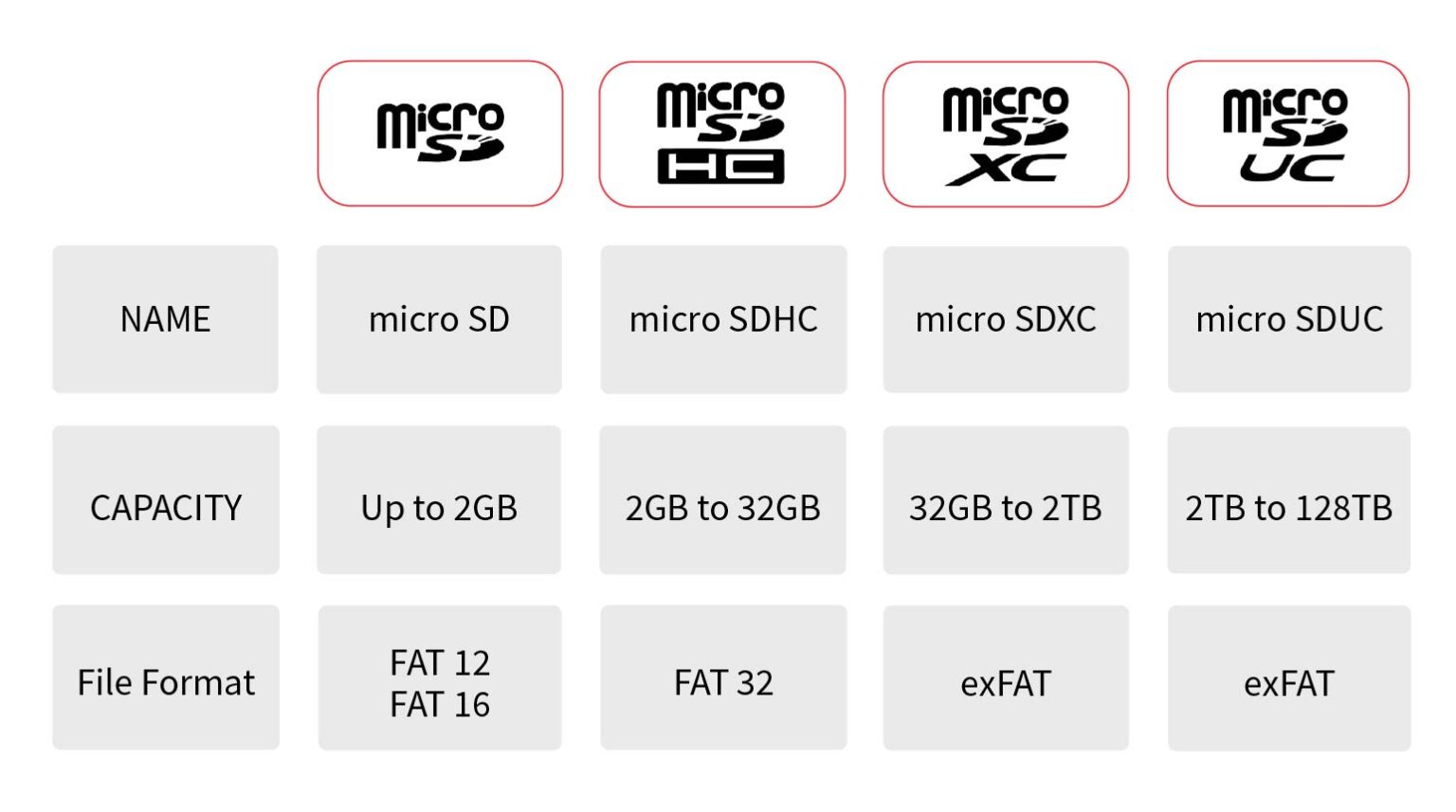
Based on storage capacity, microSD cards are classified into four standards: SD, SDHC, SDXC, and SDUC. Because these standards feature backward compatibility, the newer the standard your device supports, the more card types it can use:
Decoding microSD Card Symbols
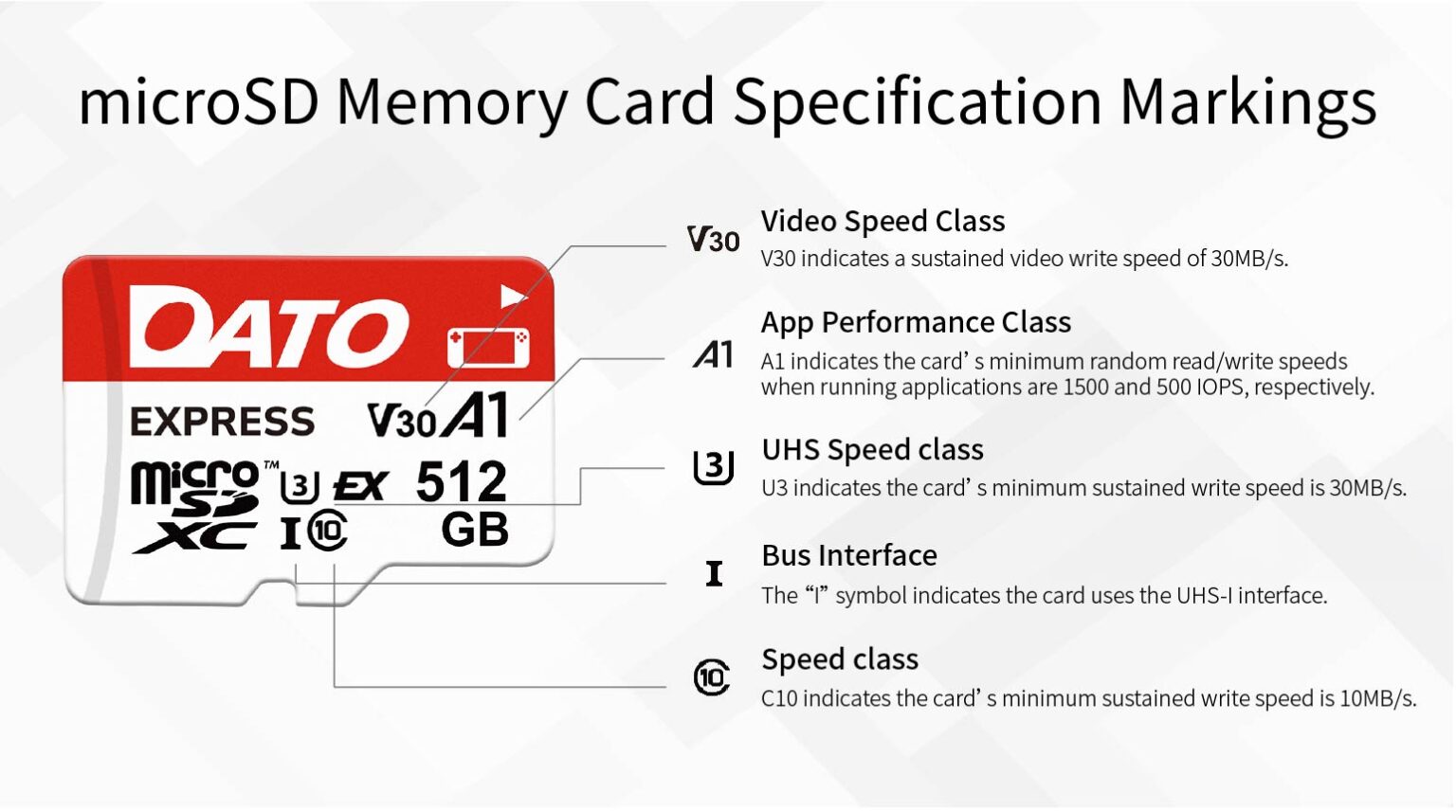
The bus interface acts as the data transfer highway between the memory card and your device. Today’s primary high-speed bus interface is UHS (Ultra High Speed), a standard developed by the SD Association for SD, SDHC, and SDXC flash memory cards.
Based on transmission bandwidth, it is categorized into three types: UHS-I, UHS-II, and UHS-III, which deliver theoretical maximum transfer speeds of 104 MB/s, 312 MB/s, and 624 MB/s, respectively. You can easily identify a card’s bus interface by looking for the Roman numerals I, II, or III on its surface.
In addition to the three UHS interfaces mentioned above, there is also the microSD Express interface. Compared to traditional microSD cards, it utilizes the PCIe 3.1 interface and NVMe 1.3 protocol. Its theoretical maximum transfer speed reaches approximately 985 MB/s, making it about ten times faster than UHS-I and significantly boosting the memory card’s transmission speed. This is indicated by the symbol ‘EX’ on the card.
microSD Card Speed Classes
Unlike bus interfaces, which indicate the maximum potential data transfer speed, speed classes define a memory card’s minimum sustained write speed. Speed classes are primarily divided into four categories: Speed Class, UHS Speed Class, Video Speed Class, and Application Performance Class.
1. Speed Class
The standard Speed Class, indicated by a “C” symbol on the card, is an early standard used to classify memory card speeds. It represents the card’s minimum sustained write speed. The classes are divided into C2, C4, C6, and C10, which correspond to 2, 4, 6, and 10 MB/s, respectively.
2. UHS Speed Class
The UHS Speed Class is indicated by a “U” symbol on the card and represents the minimum sustained write speed of the memory card. It is currently divided into two classes: U1 and U3.
Class | Symbol | Minimum sustained write speed | Common Uses |
UHS Speed Class 1 | U1 | 10MB/s | Full HD video recording general everyday storage |
UHS Speed Class 3 | U3 | 30MB/s | 4K video recording action camera recording |
3. Video Speed Class
The Video Speed Class is marked on the card with a capital “V.” It was introduced to meet the performance demands of advanced cameras and professional video recording. Based on the minimum sustained write speed, it is divided into five levels: V6, V10, V30, V60, and V90. It is an important reference when selecting a memory card for video shooting.
Class | Minimum sustained write speed | Common Uses |
V6 | 6MB/s | Standard definition video, basic HD video |
V10 | 10MB/s | Full HD high-resolution video recording |
V30 | 30MB/s | 4K video recording, action camera recording, drone recording |
V60 | 60MB/s | High-end 4K video, some 8K video recording |
V90 | 90MB/s | Professional 8K video, 360-degree video recording, VR content creation |
4. Application Performance Class
The Application Performance Class is divided into A1 and A2, primarily indicating the memory card’s random read and write performance.
Class | Minimum random read | Minimum random write | Minimum sustained write speed | Common Uses |
A1 | 1,500 IOPS | 500 IOPS | 10 MB/s | General data access |
A2 | 4,000 IOPS | 2,000 IOPS | 10 MB/s | Complex multitasking |
Comparison of the Four Speed Classes
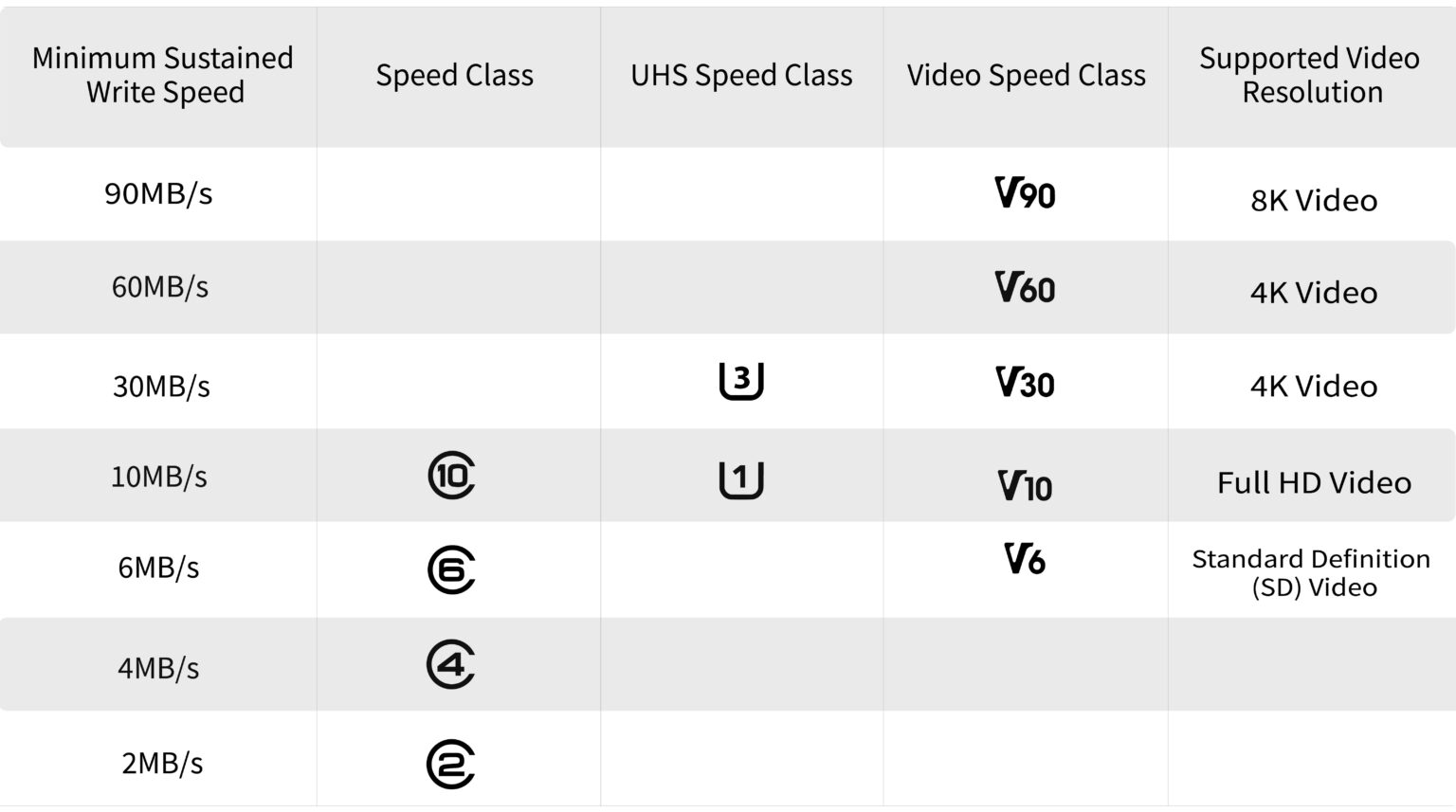
Now that you understand the interface and speed class markings on memory cards, the next step is to choose a card based on your specific needs. Different devices have distinct requirements for speed, capacity, and durability. Choosing the right specifications helps you balance performance and budget. Below, we outline the key buying considerations for several common devices to help you quickly find the best microSD card for your setup.
1. Phones/Tablets
Smartphones make it easy to capture everyday moments through photos and videos. However, as image quality improves, a single photo or 4K video can take up tens or even hundreds of megabytes of storage. As these files accumulate, your phone or tablet can quickly run low on space. If your Android smartphone or tablet has a microSD card slot, consider choosing a memory card with a UHS-I bus interface and an A1 or A2 Application Performance Class rating. This combination helps support smooth app performance.
2. Drones
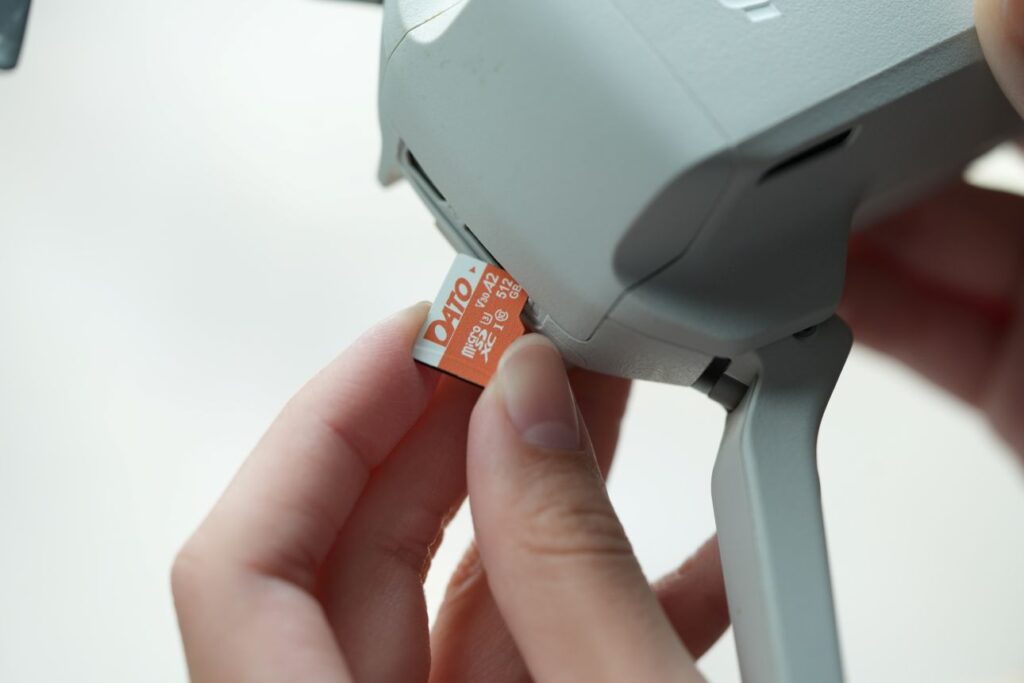
Drones need to record high-quality video continuously during flight. If a memory card’s write speed is insufficient, recording may be interrupted, frames may be dropped, or files may even become corrupted. When choosing a memory card, pay attention to its interface specifications, write speed, and storage capacity. A card rated V30 or higher, with both A2 and U3 markings, is recommended for stable recording and smooth footage.
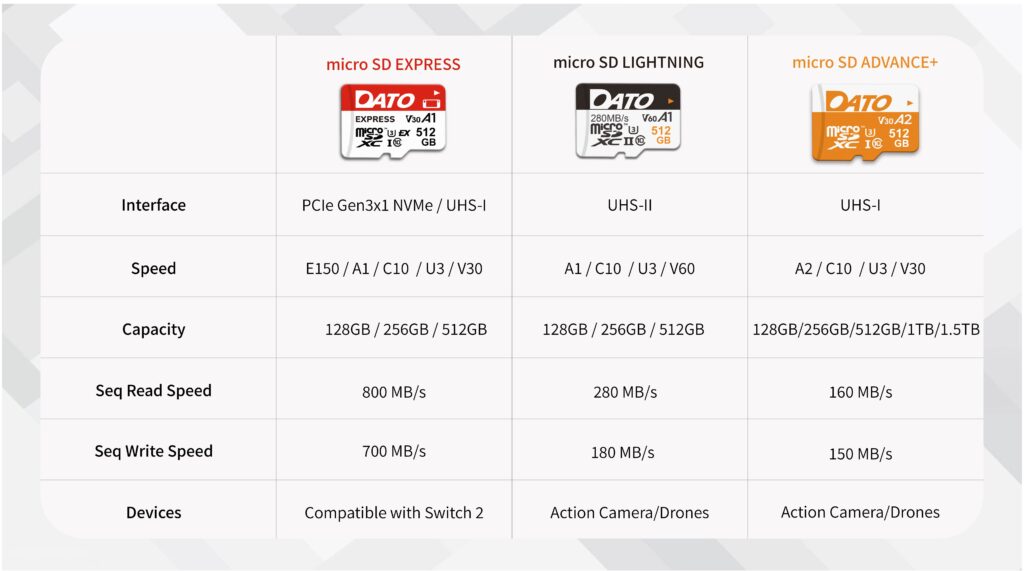
The Datotek Advance+ microSD card supports the UHS-I interface and meets U3 and V30 speed class requirements, ensuring smooth 4K UHD video recording and uninterrupted continuous capture. Its A2 Application Performance Class rating also enables faster thumbnail browsing and file access when transferring data after drone shoots, helping users efficiently organize large numbers of files.
3. Action Cameras
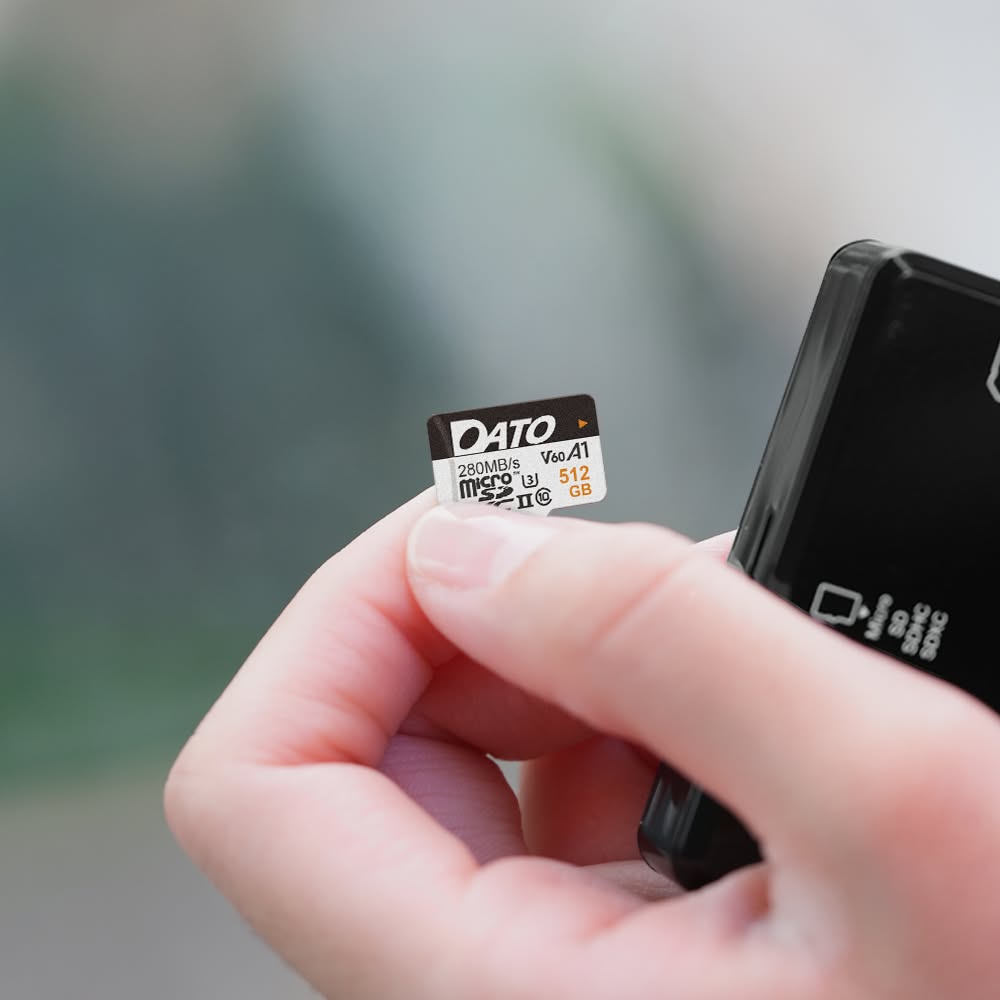
With the growing popularity of sports and outdoor activities, more people are using action cameras to capture their everyday adventures. However, these cameras operate in much harsher environments than standard devices. Extreme summer heat, intense vibrations while cycling, and water pressure during dives can all compromise the stability of a memory card. If a card lacks durability, you risk experiencing read and write errors or even complete data loss.
The Datotek Lightning microSD card is specifically designed to handle these demanding conditions. Featuring a UHS-II interface alongside U3 and V60 speed class ratings, it reliably supports 4K video recording and is backward compatible with UHS-I devices, ensuring every moment of your action footage is flawlessly preserved. Furthermore, when paired with a UHS-II card reader, large volumes of 4K footage can be rapidly offloaded to your computer, which significantly reduces your overall waiting time.
4. Nintendo Switch 2
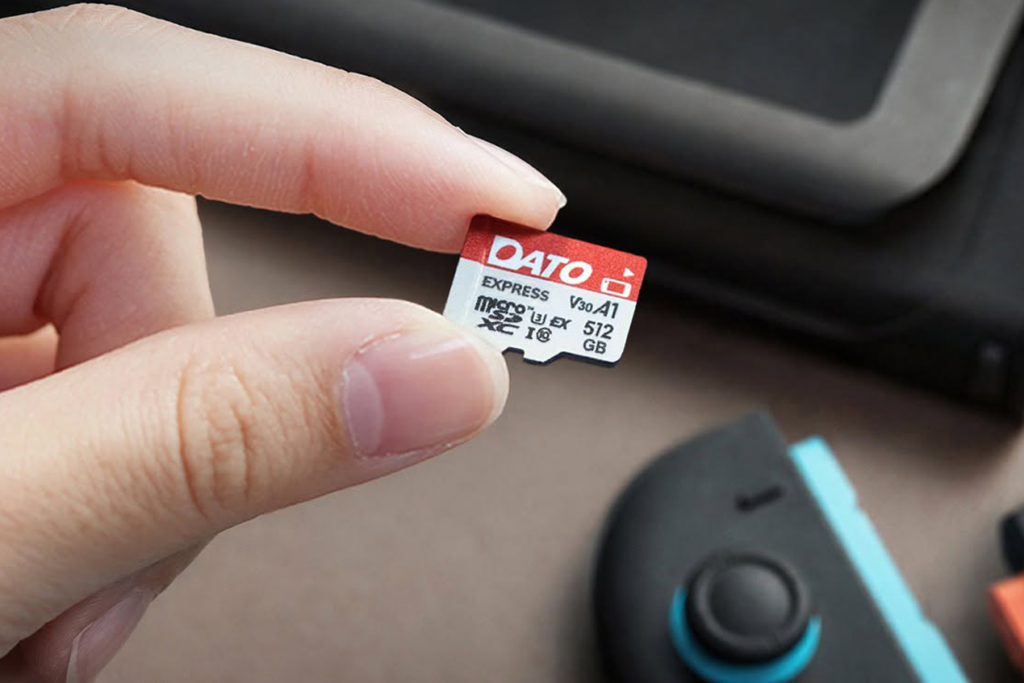
For the Nintendo Switch 2, using a memory card that supports the microSD Express standard is an absolute must. While a regular microSD card will physically fit into the console, it cannot be used to save or read downloaded games.Therefore, when shopping for a card, make sure to look for the “EX” logo on its surface and ensure the capacity is 2TB or less.
As a compatible option, the Datotek microSD Express card fits the Switch 2 expansion standards. It offers an ample 512GB capacity for your digital library. Equipped with U3 and V30 speed ratings and read speeds up to 800 MB/s, it supports faster loading times, letting you upgrade your storage space without sacrificing performance.
Inquire About DATO’s SSD Solutions for Handhelds


DATOTEK INTERNATIONAL CO., LTD.
3F, No. 34, Alley 18, Lane 478, Ruiguang Rd., Taipei City 11492, Taiwan
TEL: +886-2-2658-1268
Email: datotek@datos.com.tw